
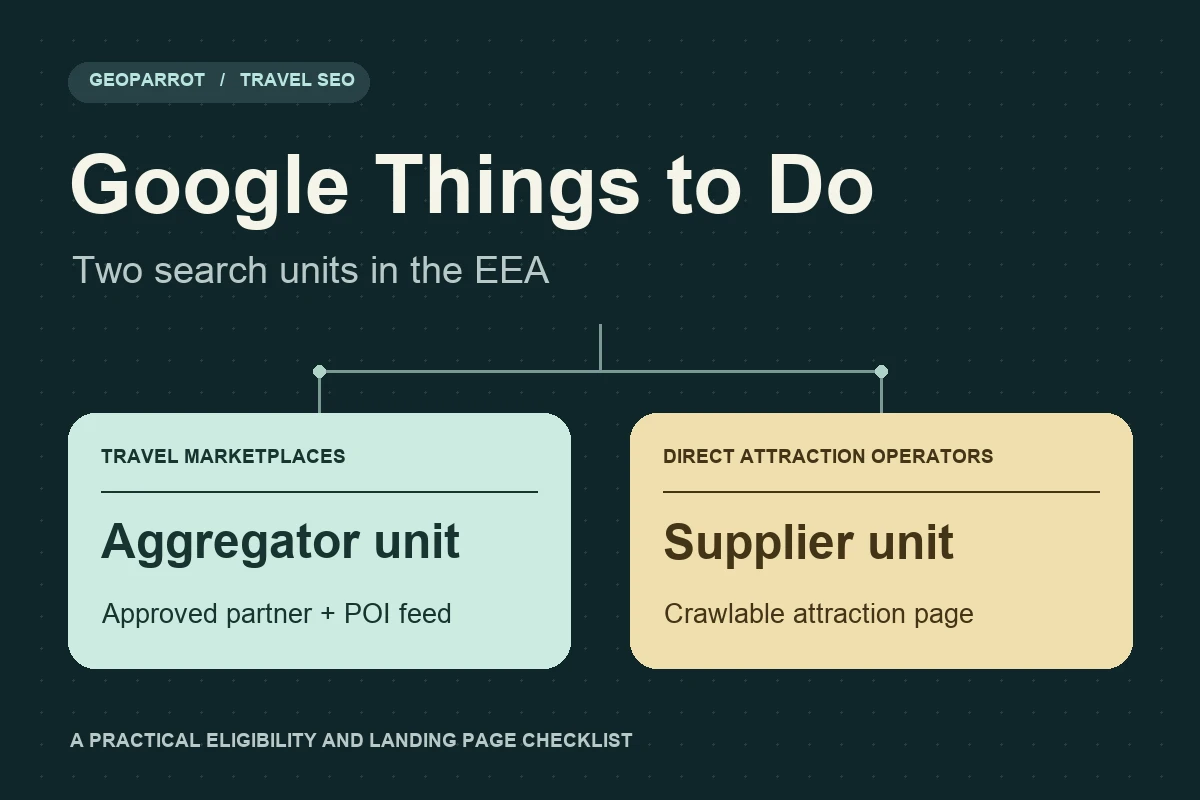
On November 9, 2026, Google Search Central documented support for Things to do queries in two search features for users in the European Economic Area (EEA): the aggregator unit and the supplier unit. For a marketplace, the implementation starts with approval as a vertical search service and a point-of-interest feed. For a museum or other direct operator, it starts with the public attraction page Google can crawl. The two routes have different requirements, and an activity you already send to Google may belong to a different integration. Google’s Actions Center overview already described attractions in September, so the November changelog gives teams a dated confirmation in Search Central. It leaves the first day of live placement open.
Evidence and scope. This checklist interprets Google’s Actions Center overview and Search Central documentation as reviewed on November 10, 2026. The example below is hypothetical. GeoParrot did not submit a feed, verify a live placement, or measure traffic or bookings for these units.
Google Search Central documentation changelog
Choose the route for the inventory you own
| Route | Who should assess it | Where to start | First check |
|---|---|---|---|
| EEA aggregator unit | An approved vertical search service with relevant listings | Google’s aggregator interest form and Local Vertical Search Service point-of-interest (POI) feed | The entity qualifies under the Local VSS policies and has a dedicated landing page on the aggregator site. |
| EEA supplier unit | A direct operator with a website serving EEA users | The operator’s own crawlable website. Available feeds can enhance supplier results. | The final page identifies the venue and exposes useful visit or ticket information to users and crawlers. |
| Things to do product integration | An attraction, tour operator, activity provider, or eligible distribution partner assessing product listings | The separate Actions Center Things to do product feed or a connectivity partner | The specific bookable product and option meet the requirements for that integration. |
The supplier unit appears only when the aggregator unit appears. That makes supplier eligibility and observed visibility separate things to track. For aggregators, Google says clicks go to the page provided by the aggregator. The quality of that destination deserves its own release check.
Aggregator unit documentation · Supplier unit documentation · Things to do product integration and eligibility
Start with the attraction, then map its offers
Inventory teams often organize their work around products. One museum might have general admission, a guided tour, and a bundle with a second venue. The first question for the Local VSS feed is which physical point of interest qualifies. Google lists museums, landmarks, and theme parks as examples of supported attraction categories. Its Local VSS policy lists guided tours, boat excursions, and temporary events as exclusions from that attraction category. A distinct ticket or tour can be assessed separately against the Things to do product integration’s own requirements.
Build a crosswalk with one line per attraction, then associate the relevant products in your own inventory system. Give each line an entity ID, canonical venue name, address, market and language, source of opening hours, venue URL, product owner, and a review date. Add a field for the integration you intend to use. This catches a common handoff error: a team verifies that a tour can be booked and assumes that the tour also belongs in the attraction feed.
Local VSS eligibility and supported POI types · GeoParrot’s comparison of travel marketplace discovery and booking paths
Run four checks before releasing a feed or landing page
- Confirm who owns the route. The marketplace partner owner should record the aggregator onboarding status and the applicable feed specification. The direct operator should assign the attraction page to a web owner and identify any external ticketing vendor. Escalate uncertain entity types before you invest in feed automation.
- Test the destination as a visitor. Follow the exact URL in the feed or the operator’s public links in a fresh mobile session. Check the final destination after redirects for the venue name, address, hours where relevant, and a usable next step. For the aggregator feed, Google requires
brand_landing_pagesdestinations to deep-link to the POI without forced login, paywalls, or a generic directory. Inspect the default URL and the locale variants, including an unsupported language that should fall back to the default. GeoParrot’s Klook global and Korea audit offers a concrete example of reviewing journeys by locale. - Check ingestion and the landing page separately. For the Local VSS feed, validate the JSON before upload, follow the daily full-refresh requirement, and review ingestion history in the Partner Portal. Compare the accepted entity’s name, address, image, and landing URL with the public page. If a locale redirects to a city directory, fix the mapping even if the feed validates. Direct suppliers can instead inspect their attraction URL in Search Console and compare the rendered page with what a signed-out visitor sees. GeoParrot’s GetYourGuide destination-search audit illustrates how to distinguish a destination browse page from the page that answers a specific travel need.
- Verify the booking handoff and agree what to count. Walk from the arrival page to the ticket selector, check that the same attraction is still selected, then follow the link to checkout. Document whether your team can observe the confirmed order on the final domain. Keep feed acceptance, observed search placement, landing sessions, and confirmed bookings as separate measures. GeoParrot’s Viator booking-confidence audit offers examples of the questions travellers need answered before they commit.
POI feed specification and validation workflow · Things to do product landing page guidelines
Worked example: One museum, two booking paths
Suppose a museum in France sells admission on its own site and lists the same admission through an online travel marketplace. The marketplace also sells a guided walk that meets outside the museum. Start with the museum as the candidate POI. If the marketplace is approved and the entity meets the Local VSS requirements, check its dedicated museum page and the localized URLs sent in the feed. Assess the guided walk independently under the product integration. A shared meeting location does not make the walk an attraction entity.
The museum can review its own supplier readiness in parallel. Its crawlable visit page should identify the museum and link clearly to the admission path. If the marketplace’s French URL lands on a city-wide attractions page, record that as a landing-page defect and route it to the marketplace web team. If the museum’s own page sends users to the correct ticketing vendor but confirmation data is unavailable, record outbound ticket clicks as a separate metric and ask the vendor which confirmation data can be shared. Keep each issue attached to the route and owner who can fix it.
What to record after launch
Set up a small observation sheet with the query, country, language, device, timestamp, and unit observed. Save the landing URL reached from the result where you can verify it. For a marketplace feed, add the relevant ingestion timestamp and entity ID so an engineer can reproduce the check. Where analytics or partner reporting identifies the placement reliably, report it separately. Otherwise, label landing-page or organic-search totals as broader context. Use the first week to catch broken paths and unresolved tracking before comparing booking performance.
Frequently asked questions
What changed for Things to do queries in Google Search?
Google documented support for Things to do queries in the aggregator and supplier units available to users in the European Economic Area. Whether a particular search shows either unit depends on the query and the search experience.
Does a direct attraction operator need an aggregator feed?
Google does not require an additional feed for supplier eligibility. The site must serve EEA users and the business must be a direct provider with relevant crawlable information. Available supplier feeds may enhance results. The supplier unit only appears alongside the aggregator unit.
Can I reuse my Things to do product feed for the aggregator unit?
Google points aggregators to the Local VSS point-of-interest feed for this unit. Use the eligibility rules and feed specification for that integration. Review your existing Things to do product feed separately at the bookable product or option level.
How should I measure bookings from these units?
Record observed placements, landing sessions, and confirmed bookings separately. Attribute a booking to a unit only when the available reporting or tracking supports that attribution. Where the purchase happens on a third-party site, confirm which booking events or reports you can access.


Leave a Reply